RanoreXPath is Ranorex’s UI locator syntax, built for desktop/mobile apps with roles and attributes that mirror the UI object model. Use this quick reference to craft reliable paths, stabilize flaky locators, and troubleshoot mismatches.
On this page
- Basic Structure
- Axes (Ranorex-Specific)
- Wildcards
- Predicates
- Functions
- Troubleshooting Tips
- Common RanoreXPath Mistakes
- RanoreXPath Best Practices
- Regex in RanoreXPath: How it Works
- Regex Examples
- Tips for Using Regex
-
Regex: Common Mistakes
Basic Structure
/role[@attribute='value']
-
Role: UI element type (e.g.,
form,button, text) -
Attribute: Ranorex-specific identifiers like
@controlname, @caption, @accessiblename
Axes (Ranorex-Specific)
| Axis | Syntax | Description |
child |
/form/child::button |
Direct children |
descendant |
/form/descendant::button |
All descendants |
descendant-or-self |
/form//button |
Self + descendants |
parent |
/form/button/.. |
Parent node |
ancestor |
/form//button/ancestor::container |
All ancestors |
preceding-sibling |
/form/button/preceding-sibling::button |
Siblings before |
following-sibling |
/form/button/following-sibling::button |
Siblings after |
Wildcards
| Wildcard | Meaning | Example |
/* |
Any element at one level | /form/*/button |
/? |
Optional element | /form/?/button |
// |
Any depth | /form//button |
Predicates
[@caption='OK']
[@controlname~'^btn_.*'] ← regex
[@text!='Cancel']
[@text=$var] ← variable
Functions
Ranorex supports:
text(), index(), pos(), x(), y(), width(), height()- Example:
/table/row/cell[text()='Thomas']
Troubleshooting Tips for Tricky Element Identification
1. Dynamic IDs
- Use regex:
[@id~'^img_.*'] - Avoid relying on
@id unless it's stable - Prefer
@accessiblename, @caption, or @controlname if consistent
2. Attribute Weights
- Attributes with weight < 100 are ignored in path generation
- Adjust weights via Spy or repository:
- Lower weight for volatile attributes
- Raise weight for stable ones
3. Use Ranorex Spy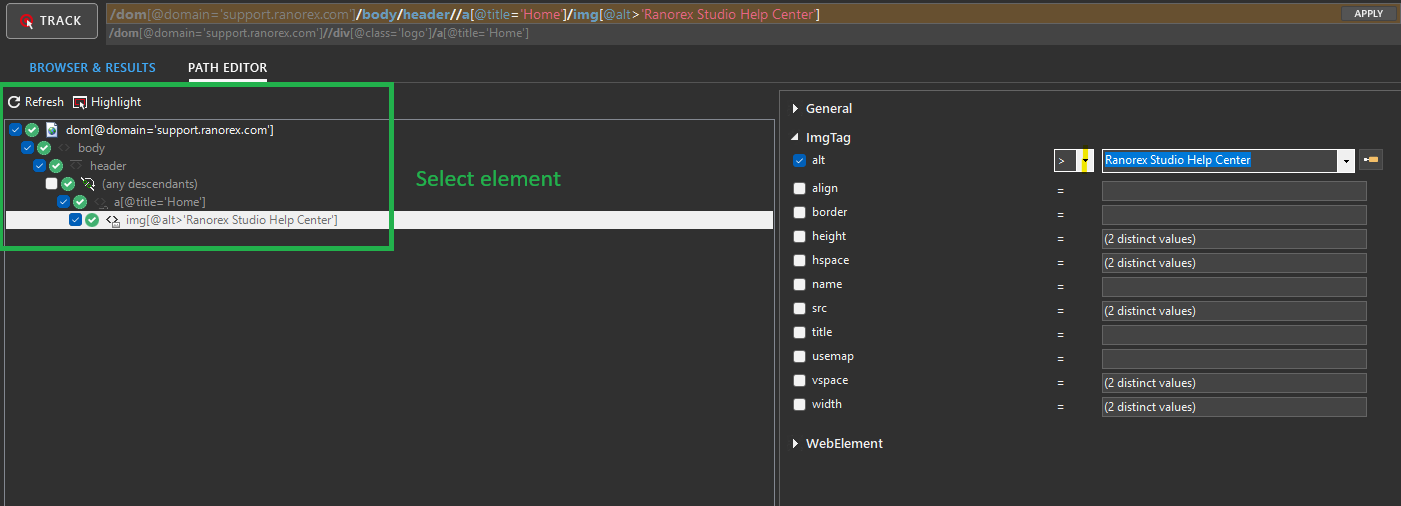
- Inspect element hierarchy
- Use Path Editor to refine manually
- Check attribute weights and visibility
4. Advanced Settings
- Use the Speed/Robustness slider:
- 0% = fast, brittle
- 100% = slow, robust
- 30–50% = balanced
5. Re-track Elements
- If paths break after UI changes, re-track using Spy
- Use Maintenance Mode to isolate failures
6. Relative Navigation
- Use
.., ancestor::, or following-sibling::to navigate flexibly -
Example:
/cell[text()='Thomas']/../cell[@accessiblename='Age']
7. Regex in RanoreXPath
- Use
~operator for pattern matching -
Example:
[@controlname~'^btn_.*']matches dynamic button names
8. Optional Containers
- Use
/?to handle optional wrappers -
Example:
/form/?/container/button[@caption='Submit']
Common RanoreXPath Mistakes with Examples
1. Using Generic XPath Instead of RanoreXPath
❌ Mistake: Using standard XPath syntax that doesn't align with Ranorex's UI object model //button[@text='OK']
✅ Correct: Use Ranorex roles and attributes /form/button[@caption='OK']
2. Relying on Dynamic Attributes
❌ Mistake: Using unstable attributes like @id or @controlname that change between sessions.
/form/button[@controlname='btn_12345']
✅ Correct: Use regex or stable attributes.
/form/button[@controlname~'^btn_.*'] Or: /form/button[@caption='Submit']
3. Ignoring Attribute Weights
❌ Mistake: Assuming all attributes are used equally in path generation /form/button[@controlname='btnSubmit']
(But @controlname has weight < 100 and is ignored)
✅ Correct: Adjust weights in Ranorex Spy or use high-weight attributes /form/button[@caption='Submit']
4. Overusing Absolute Paths
❌ Mistake: Hardcoding full hierarchy that breaks with layout changes /form/container/panel/button[@caption='OK']
✅ Correct: Use flexible wildcards /form//button[@caption='OK']
5. Not Using Wildcards or Optional Axes
❌ Mistake: Failing to account for optional containers. /form/container/button[@caption='Submit']
✅ Correct: Use /? for optional levels. /form/?/container/button[@caption='Submit']
6. Misusing Regex Syntax
❌ Mistake: Using = instead of ~ for regex. /form/button[@controlname='^btn_.*']
✅ Correct: Use ~ for regex matching. /form/button[@controlname~'^btn_.*']
7. Skipping Ranorex Spy Validation
❌ Mistake: Writing paths manually without verifying them /form/button[@caption='OK']
(Fails because button is inside a container)
✅ Correct: Use Spy to inspect hierarchy /form/container/button[@caption='OK']
8. Not Handling Indexing Properly
❌ Mistake: Selecting ambiguous elements when multiple matches exist /form/button[@caption='OK']
(There are 3 "OK" buttons)
✅ Correct: Use index or position /form/button[@caption='OK'][1]
9. Using Text Instead of Caption or AccessibleName
❌ Mistake: Using @text which may not be exposed or reliable /form/button[@text='OK']
✅ Correct: Use @caption or @accessiblename /form/button[@caption='OK']
10. Forgetting to Re-track After UI Changes
❌ Mistake: Reusing old paths after UI redesign /form/container/button[@caption='Submit']
(Fails because button moved to a new panel)
✅ Correct: Re-track and update path /form/panel/button[@caption='Submit']
RanoreXPath Best Practices
1. Favor Stable Attributes
- Use attributes like
@caption, @accessiblename, or @textthat are less likely to change. - Avoid volatile ones like
@id, @controlname, or @automationidunless they’re consistent.
Example
/form/button[@caption='Submit']
2. Use Wildcards for Flexibility
- Use
//, /*, and /?to handle layout changes or optional containers.
Example
/form//button[@caption='OK']
3. Leverage Regex for Dynamic Elements
- Use
~operator to match patterns in dynamic IDs or names.
Example
/button[@controlname~'^btn_.*']
4. Adjust Attribute Weights
- Use Ranorex Spy to inspect and modify attribute weights.
- Increase weights for stable attributes to improve path reliability.
Tip: Attributes with weight < 100 are ignored in automatic path generation.
5. Use Relative Paths When Possible
- Avoid absolute paths that break with UI changes.
- Use
ancestor::, .., or following-sibling::to navigate contextually.
Example
/cell[text()='Thomas']/../cell[@accessiblename='Age']
6. Validate Paths with Ranorex Spy
- Always test your XPath in Spy before using it in tests.
- Use the Path Editor to refine and preview matches.
7. Handle Multiple Matches with Indexing
- If multiple elements match, use
[1], index(), or @text='value'to disambiguate.
Example
/button[@caption='OK'][2]
8. Use Variables for Dynamic Values
- Replace hardcoded values with
$variable to make paths reusable.
Example
/button[@caption=$buttonName]
9. Avoid Over-Specifying Paths
- Don’t include unnecessary hierarchy levels unless needed.
- Keep paths concise and focused on unique identifiers.
Bad:
/form/container/panel/groupbox/button[@caption='OK']
Better:
/form//button[@caption='OK']
10. Document Complex Paths
- For tricky or non-obvious paths, add comments in your repository or test steps.
- Helps future maintainers understand your logic.
Regex in RanoreXPath: How It Works
Syntax
Ranorex uses the ~ operator to apply regex to attribute values:
[@attribute~'regex_pattern']
-
@attribute: The Ranorex-specific attribute (e.g., @controlname, @caption, @id) -
'regex_pattern': A valid regular expression enclosed in single quotes
Examples of Regex in RanoreXPath
1. Match Dynamic Button IDs
/button[@controlname~'^btn_.*']
Matches any button whose controlname starts with btn_ (e.g., btn_OK, btn_123)
2. Match Labels Ending in a Number
/text[@caption~'Label \d+$']
Matches captions like Label 1, Label 42, etc.
3. Match Partial Text in Accessible Name
/button[@accessiblename~'Submit.*']
Matches buttons like Submit, Submit Form, Submit Now
4. Match Elements with UUID-like IDs
/container[@id~'^[a-f0-9\-]{36}$']
Matches IDs like 123e4567-e89b-12d3-a456-426614174000
Tips for Using Regex in RanoreXPath
- Use anchors ('^' for start, '$' for end) to control match boundaries
- Escape special characters like '.' or '[' if used literally
- Test your regex in Ranorex Spy’s Path Editor before using it in scripts
- Use regex sparingly, only when necessary to handle dynamic or unpredictable values
Common Mistakes to Avoid
| Mistake | Why It Fails | Correct |
[@id='^btn_.*'] |
Uses = instead of ~ | [@id~'^btn_.*'] |
[@caption~"Submit.*"] |
Uses double quotes | [@caption~'Submit.*'] |
[@text~'OK'] |
Regex not needed for exact match | [@text='OK'] |